Continuous Delivery with Argo CD Image Updater and AWS ECR
Translated from the original Velog post: [CD] ArgoCD Image Updater를 활용한 Continuous Delivery w/AWS ECR

Argo CD was selected so deployment state could be managed through a GUI and rollback history could be inspected easily.
Choosing the CD Stack
At first, environments were not separated, so the CD repository was structured without Kustomize:
.
├── README.md
└── backend
    ├── deployment.yaml
    ├── hpa.yaml
    ├── ingress.yaml
    └── service.yaml
Argo CD was configured to track that repository.
Continuous Delivery
Argo CD watches the GitHub repository and synchronizes it with the cluster for CD, while Jenkins handles CI. After a new image was pushed to ECR, the image tag in the repository containing the Kubernetes manifests still needed to be updated.
One option was to update GitHub directly from the Jenkins pipeline. However, pushing commits from Jenkins through SSH adds operational complexity and does not use Argo CD’s visibility as effectively.
Flux CD was also considered, but Argo CD’s GUI made it easier to inspect and operate the deployment flow. Argo CD also had more troubleshooting material available.
While looking for a way to update image tags, Argo CD Image Updater fit the workflow well. Since Argo CD was already responsible for deployment, letting Argo CD handle the image update flow was a natural extension.
Argo CD Image Updater
A tool to automatically update the container images of Kubernetes workloads that are managed by Argo CD.
As the description says, it is an Argo CD tool that automatically updates container images.
Argo CD Image Updater was still under active development, so it was not recommended for critical environments. At the time of writing, v1 had not been released yet, and the latest version was v0.15.1.
This Continuous Delivery flow needed:
- Tracking private ECR image updates with
latest/newest-build - Managing application manifests with Kustomize
- Updating image tags in GitHub
Kustomize
Argo CD Image Updater only supports image updates for Argo CD applications generated from Helm or Kustomize.
The folder structure was changed as follows, and backend/overlays/dev was applied to the cluster and Argo CD:
.
├── README.md
└── backend
    ├── base
    │   ├── deployment.yaml
    │   ├── hpa.yaml
    │   ├── ingress.yaml
    │   ├── kustomization.yaml
    │   └── service.yaml
    └── overlays
        └── dev
            └── kustomization.yaml
Argo CD Image Updater Setup
The setup followed the official documentation.
Method 1 from the installation guide was used to install it with YAML. The following resources were created:
serviceaccount/argocd-image-updater created
role.rbac.authorization.k8s.io/argocd-image-updater created
clusterrole.rbac.authorization.k8s.io/argocd-image-updater created
rolebinding.rbac.authorization.k8s.io/argocd-image-updater created
clusterrolebinding.rbac.authorization.k8s.io/argocd-image-updater created
configmap/argocd-image-updater-config created
configmap/argocd-image-updater-ssh-config created
secret/argocd-image-updater-secret created
deployment.apps/argocd-image-updater created
After installation, the required settings were changed manually.
argocd-image-updater-config
Add the following configuration to the argocd-image-updater-config ConfigMap:
data:
  log.level: debug # default: info
  registries.conf: |
    registries:
      - name: AWS ECR
        api_url: https://<AWS_ACCOUNT_ID>.dkr.ecr.<AWS_REGION>.amazonaws.com
        prefix: <AWS_ACCOUNT_ID>.dkr.ecr.<AWS_REGION>.amazonaws.com
        ping: yes
        credentials: ext:/app/aws/ecr.sh
        credsexpire: 12h # ECR tokens expire after 12 hours
        tagsortmode: latest-last
log.level was set to print detailed logs, and registries.conf was added to connect to the ECR repository.
To connect to ECR, an additional Secret must be configured and /app/aws/ecr.sh must be mounted.
Because ECR tokens expire after 12 hours, credsexpire must be set.
If you use a registry other than ECR, refer to the examples in the official documentation.
AWS Credentials and Update Script
To access ECR, credentials and a command for retrieving the ECR password are required.
# config
[default]
region = ap-northeast-2

# credentials
[default]
aws_access_key_id = ...
aws_secret_access_key = ...
# ecr.sh
#!/bin/sh
aws ecr --region ap-northeast-2 get-authorization-token --output text --query 'authorizationData[].authorizationToken' | base64 -dkubectl create secret generic aws-config --from-file=config -n argocd
kubectl create secret generic aws-cred --from-file=credentials -n argocd
kubectl create configmap ecr-pwd --from-file=ecr.sh -n argocdThen modify the argocd-image-updater Deployment to mount each Secret and ConfigMap:
containers:
  - volumeMounts:
      - mountPath: /app/.aws/config
        name: aws-config
        subPath: config
      - mountPath: /app/.aws/credentials
        name: aws-credentials
        subPath: credentials
      - mountPath: /app/aws
        name: script-volume
volumes:
  - name: aws-config
    secret:
      defaultMode: 420
      secretName: aws-config
  - name: aws-credentials
    secret:
      defaultMode: 420
      secretName: aws-cred
  - configMap:
      defaultMode: 511
      name: ecr-pwd
    name: script-volume
Argo CD
Connect Argo CD and Argo CD Image Updater. If they are running in the same cluster and namespace, no separate Argo CD endpoint setting is required.
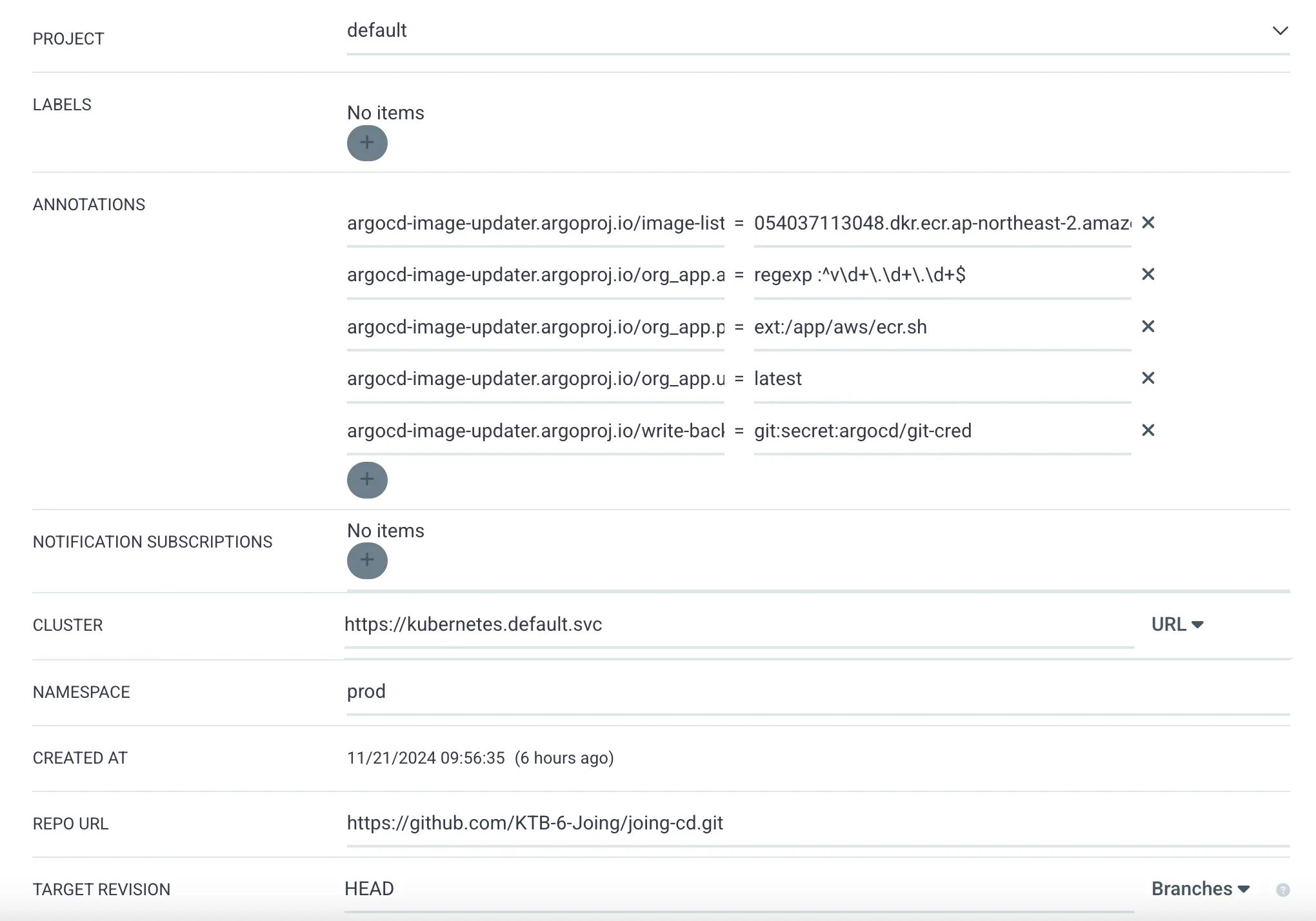
Add the annotations to the Argo CD Application.
GitHub Token
Before configuring Argo CD, create a GitHub token with push permission and register it as a Secret in the argocd namespace:
kubectl create secret generic git-cred -n argocd \
  --from-literal=username=... \
  --from-literal=password=<TOKEN>
The token can be stored in argocd-image-updater-secret or in a separate Secret.
The important part is to reference it correctly from Argo CD Image Updater.
Refer to the update methods documentation for details.
Annotations
Add annotations from the existing Application > Details > Summary page.
argocd-image-updater.argoproj.io/image-list: <AWS_ACCOUNT_ID>.dkr.ecr.<AWS_REGION>.amazonaws.com/<ECR_REPO>
argocd-image-updater.argoproj.io/org_app.allow-tags: regexp:^v\d+\.\d+\.\d+$ # vN.N.N format tags
argocd-image-updater.argoproj.io/org_app.pull-secret: ext:/app/aws/ecr.sh
argocd-image-updater.argoproj.io/org_app.update-strategy: latest # latest/newest-build
argocd-image-updater.argoproj.io/write-back-method: git:secret:argocd/git-cred # GitHub Secret
When the ECR repository is updated, the image tag in the GitHub repository is updated automatically.
Verifying the Flow

First, check the image tag v0.0.24.
The 24 at the end represents the Jenkins build number.
The next tag is v0.0.25, so run the 25th pipeline.
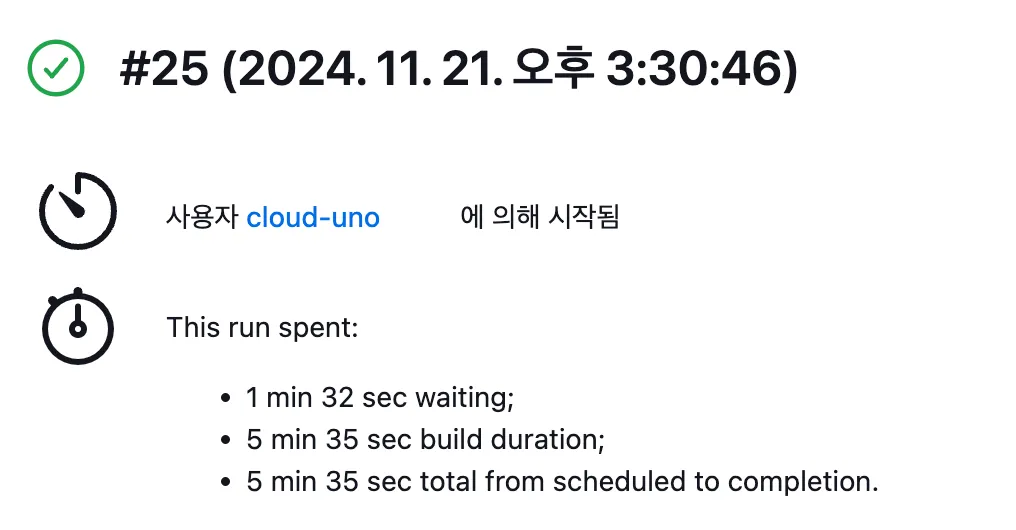
After the pipeline finishes, verify that the image has been updated in the ECR repository.
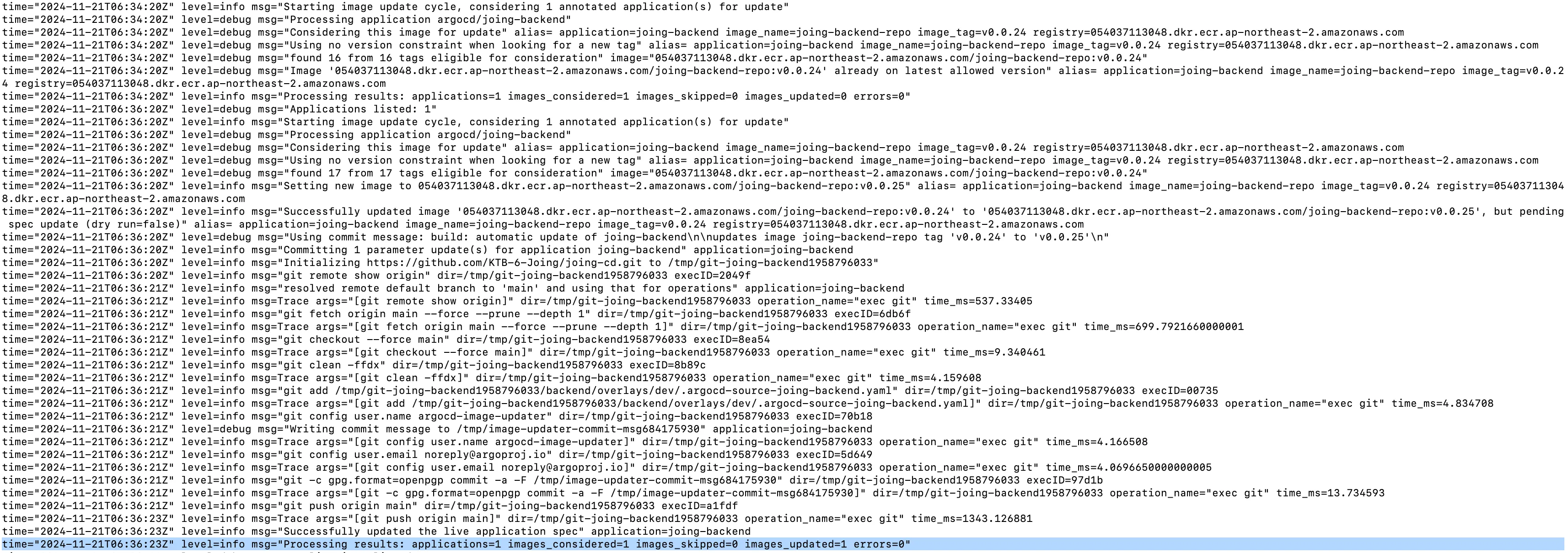
By default, Argo CD Image Updater checks registered repositories every two minutes. The Image Updater logs showed that the tag change had been reflected in GitHub.
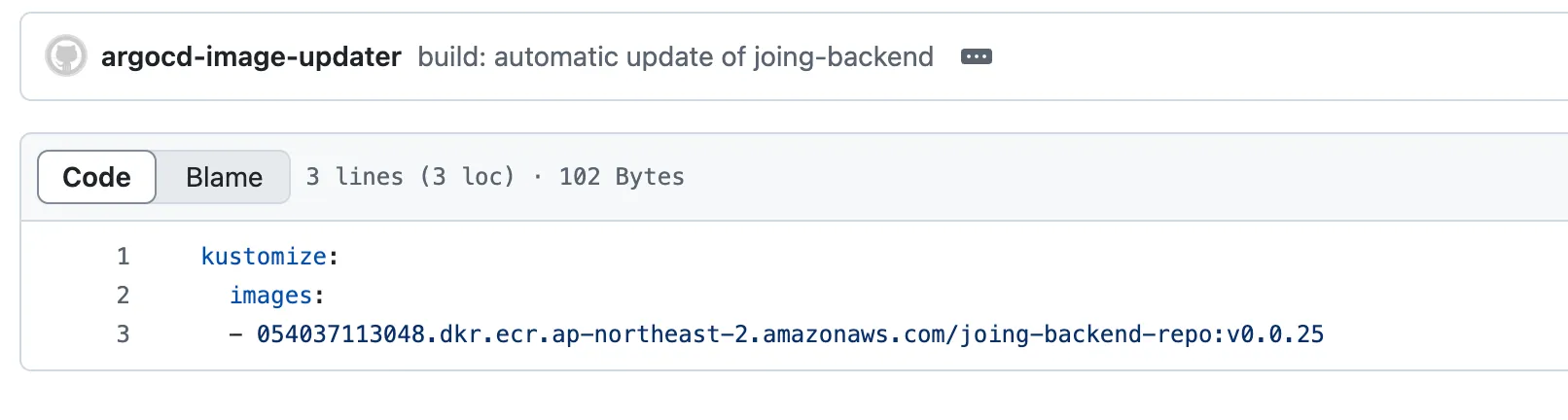
The change was applied under ./backend/overlays/dev in GitHub, and Argo CD detected the change as OutOfSync.

After pressing Sync, the image was updated through the configured RollingUpdate.


Closing
Argo CD Image Updater connects ECR image updates to Git-based Kubernetes manifests without adding tag-update logic to Jenkins. For non-critical environments, it automates image-tag updates while Argo CD remains the deployment control point.